AI search visibility is how often AI engines like ChatGPT, Perplexity, and Google AI Overviews name or cite your brand in their answers. You can measure it this week with a free prompt audit and three free reports from Bing and Google.
Most guides on this topic are written by companies selling a tracking platform, so they start at the subscription. This one starts where a small WordPress or WooCommerce team really is. That means a spreadsheet, a free Bing account, Google Analytics and about two hours a month.
You will get the four metrics worth tracking and a step-by-step audit. After that come the first-party reports nobody mentions and a crawler check you can copy. Then come the changes that move the numbers, the mistakes that waste a month, and when a paid tool starts to earn its fee.
What Is AI Search Visibility?
AI search visibility measures whether an AI answer engine mentions, recommends or links your brand when someone asks a question in your category. It is closer to a share of the conversation than a ranking position. You either appear in the generated answer, or the reader never hears your name.
That difference matters because the AI layer is already large. A May 2026 study of 55,393 queries found that Google AI Overviews appeared on 13.7% of searches overall and on 64.7% of question-form queries.
The same study found that nearly 30% of the domains cited in those overviews did not appear on the first page of results at all. So a page that ranks on page two can still be quoted, and a page that ranks third can still be skipped.
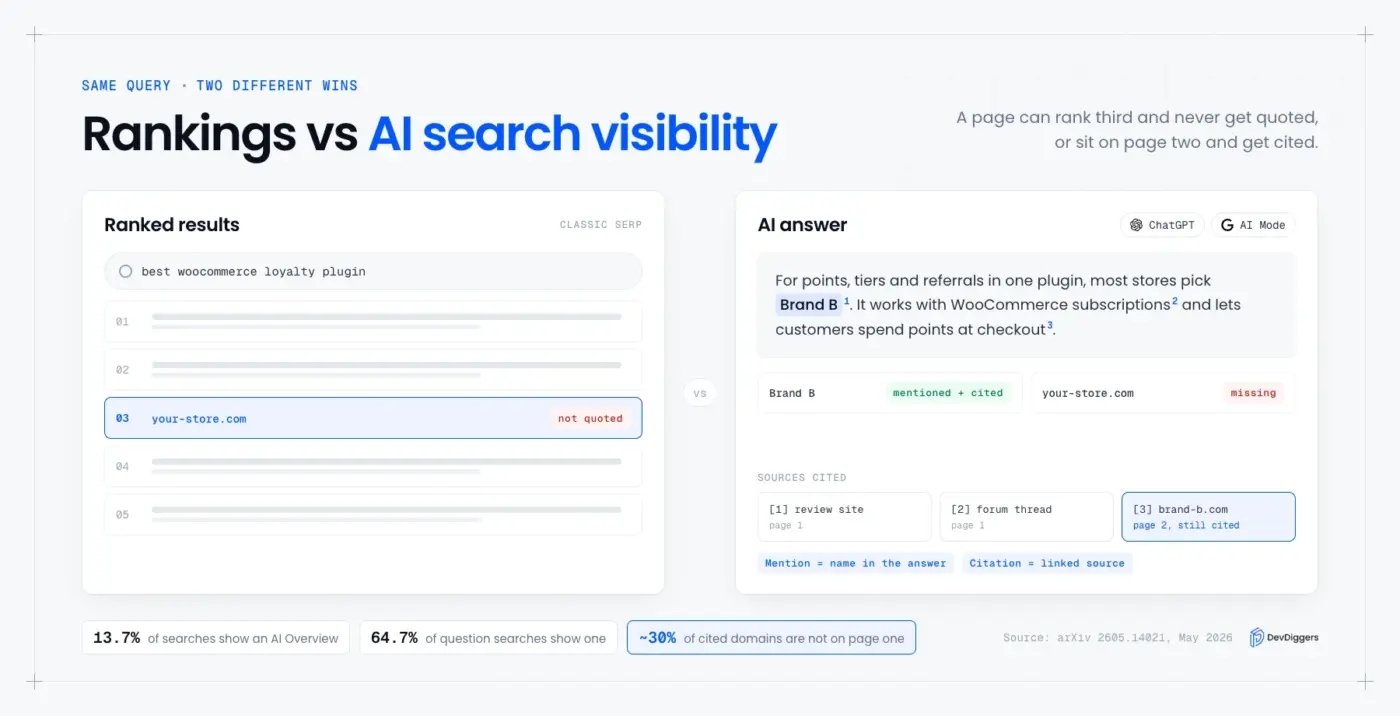
Visibility here has two parts that are easy to blur. A mention is your brand name inside the answer text, and a citation is a link to one of your pages as a source. Brand mentions in AI answers get your name known, while citations drive the click, and you want to track both separately.
The Four Metrics That Measure AI Search Visibility
Four numbers cover almost everything worth knowing about AI search visibility: citation rate, share of AI voice, recommendation position and answer accuracy. Each one answers a different question about the same set of answers. Track all four against a fixed prompt list, or the trend line means nothing.
| Metric | What it answers | How to calculate it |
|---|---|---|
| Citation rate | Do we appear at all? | Answers that mention or cite you, divided by total answers |
| Share of AI voice | How much of the category conversation is ours? | Your brand mentions, divided by all brand mentions in the same answers |
| Recommendation position | When a list appears, where are we in it? | Average of your position across answers where a ranked list appears |
| Answer accuracy | Is what the AI says about us true? | Answers with correct facts about you, divided by answers that mention you |
Citation rate is the headline number and the easiest to explain to anyone. Share of AI voice is the slower, more honest one, because it compares you with every competitor named in the same answers.
Here is a worked example with round numbers. Say you run 20 prompts, three times each, for 60 answers in total. You appear in 18 of them, so your citation rate is 18 divided by 60, which is 30%.
Across those same 60 answers, the engines name brands 120 times, and 18 of those mentions are yours. That puts your share of AI voice at 15%, which is half your citation rate. The gap tells you that you show up, but usually as one name among many.
Accuracy is the metric people skip, and it bites hardest. An answer that calls a paid plugin free sends a buyer in expecting something you do not sell.
The same goes for a feature you removed last year. Log a wrong fact the same day you see it, with the prompt that produced it.
How to Measure AI Search Visibility for Free
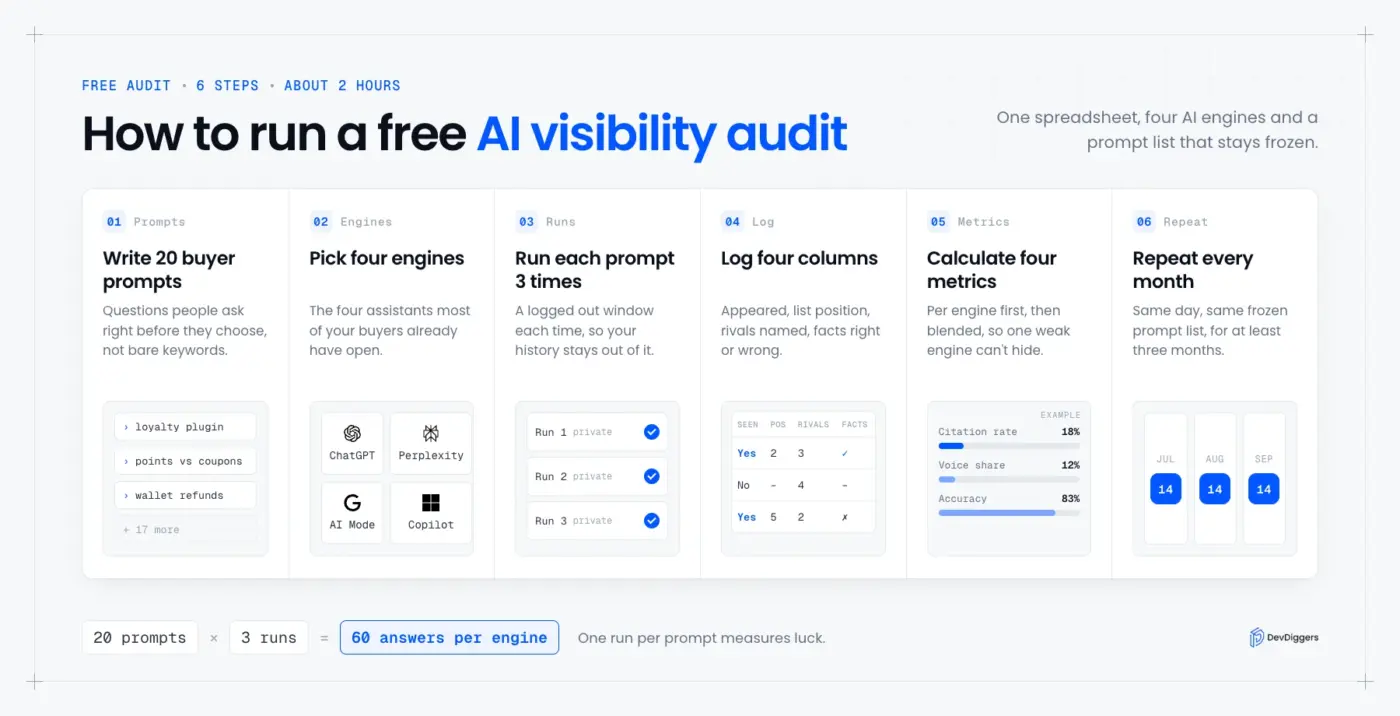
A free AI visibility audit takes one spreadsheet, four AI engines and about two hours for the first run. You write a fixed list of buyer prompts, run each one several times per engine, and log four columns per answer. Repeat the same list every month and the numbers become a trend.
Repeating the list is the part most checklists leave out. A 2026 research paper titled Don’t Measure Once states that AI answers “vary across runs, prompts, and time”. So one run per prompt measures luck, and three runs per prompt start to measure you.
Follow these steps for the first audit:
- Write 20 buyer prompts: Use the questions people ask right before they choose, such as “best WooCommerce loyalty plugin for a small store”.
- Pick four engines: Use ChatGPT, Perplexity, Google AI Mode and Microsoft Copilot, the four assistants most of your buyers already have open.
- Run every prompt three times: Use a logged out or private window each time, so your own history does not shape the answer.
- Log four columns per answer: Record whether you appeared, your list position, the competitors named, and whether the facts about you were right.
- Calculate the four metrics: Use the formulas in the table above, per engine first and then blended.
- Repeat on the same day each month: Keep the prompt list frozen for at least three months, then retire any prompt nobody buys from.
Prompt testing gets much better when the prompts come from real buyers rather than guesses. Your support inbox, sales calls and on-site search log all show the exact phrasing people use.
If your store has no search box yet, start with adding a search bar to your WordPress site. Every query it logs is free prompt research.
Tip: Keep the per engine numbers separate before you blend them. Say a brand sits at 50% in Perplexity and 5% in Google AI Mode. A single blended score of roughly 27% hides the engine that needs the work.
The First Party Data You Already Have
Three free reports show AI visibility from the site owner’s side: Bing Webmaster Tools, Google Analytics 4 and Google Search Console. Unlike a prompt audit, they record real citations and real visits rather than samples. Each one covers a different engine, so together they fill most of the gaps.
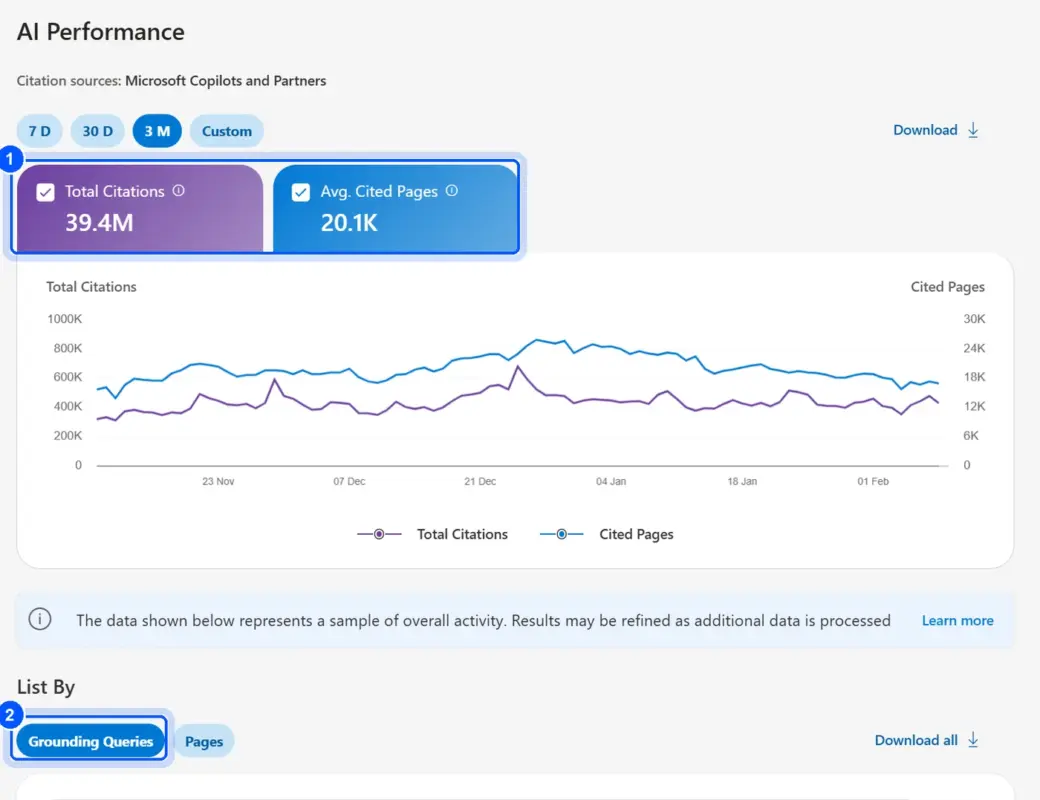
Bing is the only one that reports citations directly. Microsoft added an AI Performance report to Bing Webmaster Tools in February 2026, covering Copilot and AI summaries in Bing. It shows Total Citations, Average Cited Pages, Grounding Queries and citation counts for each of your URLs.
Grounding Queries are the useful surprise. They are the phrases the AI searched for when it pulled your page, which is the closest thing to a keyword report for LLM visibility. In June 2026, Bing added Citation Share, your share of all citations shown for the same grounding query.
Google Analytics 4 covers the clicks. OpenAI’s publisher FAQ says ChatGPT adds utm_source=chatgpt.com to its referral links. In GA4, open Reports, then Acquisition, then Traffic acquisition, and filter the session source for chatgpt.com, perplexity.ai and copilot.microsoft.com.
One small setup step makes the GA4 numbers easier to read every month. Google’s help page on custom channel groups shows where to build one, under Admin, then Data display, then Channel groups. Create an “AI assistants” channel that matches those three sources, and every report splits them out from normal referrals.
Search Console is the honest weak spot. Google’s page on AI features and your website says AI Overviews and AI Mode traffic is included in the overall Web search data. You cannot filter those appearances out. Treat Search Console as a sanity check and never as an AI report.
When a Paid AI Visibility Tool Is Worth It
A paid AI visibility tracking tool earns its fee once the manual audit stops fitting in an afternoon. That usually means more than 50 prompts, three or more competitors, or a weekly reporting habit. Below that size, a spreadsheet gives you the same answers for free.
The platforms in this space include Semrush’s AI Visibility Toolkit, Ahrefs Brand Radar, SE Ranking’s AI Visibility Tracker and Peec AI. They automate the repeated runs, store the history, and pull citation sources that are slow to collect by hand.
Run the manual method for two months first. You will know which engines matter for your category and which prompts buyers use, and that tells you which tool features you would pay for.
Check That AI Crawlers Can Reach Your Site
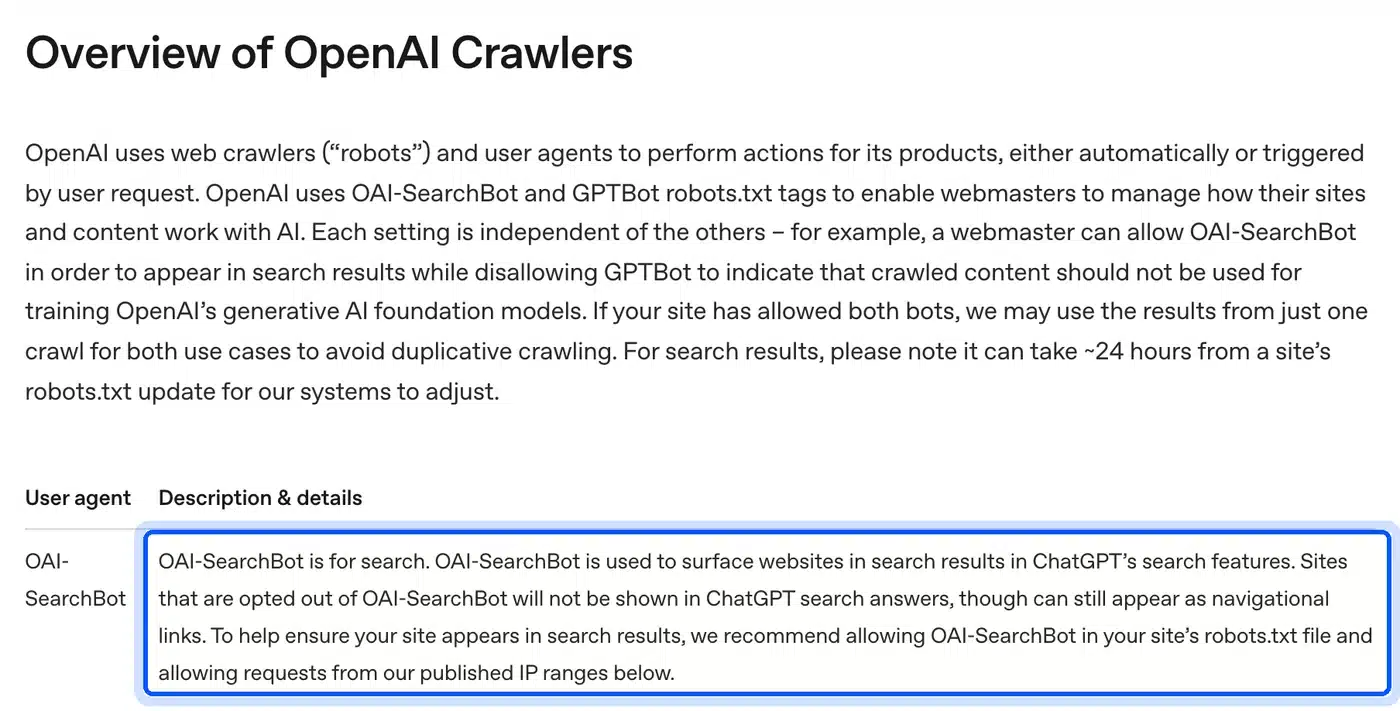
AI engines can only cite pages their search crawlers are allowed to fetch, so a blocked crawler caps your AI search visibility at zero. Each vendor runs separate bots for training and for search. Blocking the training bot is a policy choice, while blocking the search bot removes you from that engine’s answers.
| Vendor | Search and citation bot | Training bot |
|---|---|---|
| OpenAI | OAI-SearchBot | GPTBot |
| Anthropic | Claude-SearchBot | ClaudeBot |
| Googlebot | Google-Extended |
OpenAI’s crawler documentation says sites that block OAI-SearchBot “will not be shown in ChatGPT search answers”. Anthropic’s crawler help page says blocking Claude-SearchBot may reduce your visibility in its search results.
This robots.txt keeps both search bots open and opts out of training. Delete the two Disallow groups if you are happy for your content to train future models:
User-agent: OAI-SearchBot
Allow: /

User-agent: Claude-SearchBot
Allow: /

User-agent: GPTBot
Disallow: /

User-agent: ClaudeBot
Disallow: /
Note: One limit is worth knowing before you rely on robots.txt. OpenAI’s bot documentation says ChatGPT-User fetches a page because a person asked for it. For that bot, robots.txt rules may not apply at all.
How to Improve AI Search Visibility
AI search visibility improves through the same work that earns rankings, plus two habits aimed at citation. Pages need to be indexed, answer the question in their opening lines, and describe the brand the same way everywhere. Your brand also has to be discussed on third party sources the engines already trust.
Start with the basics, because nothing else matters without them. Google’s AI features guide says a page must be indexed and able to show a snippet to appear as a supporting link. If a page is missing from Google, fix that first with a guide to submitting your website to Google search.
Then work through these changes, in roughly this order of effort:
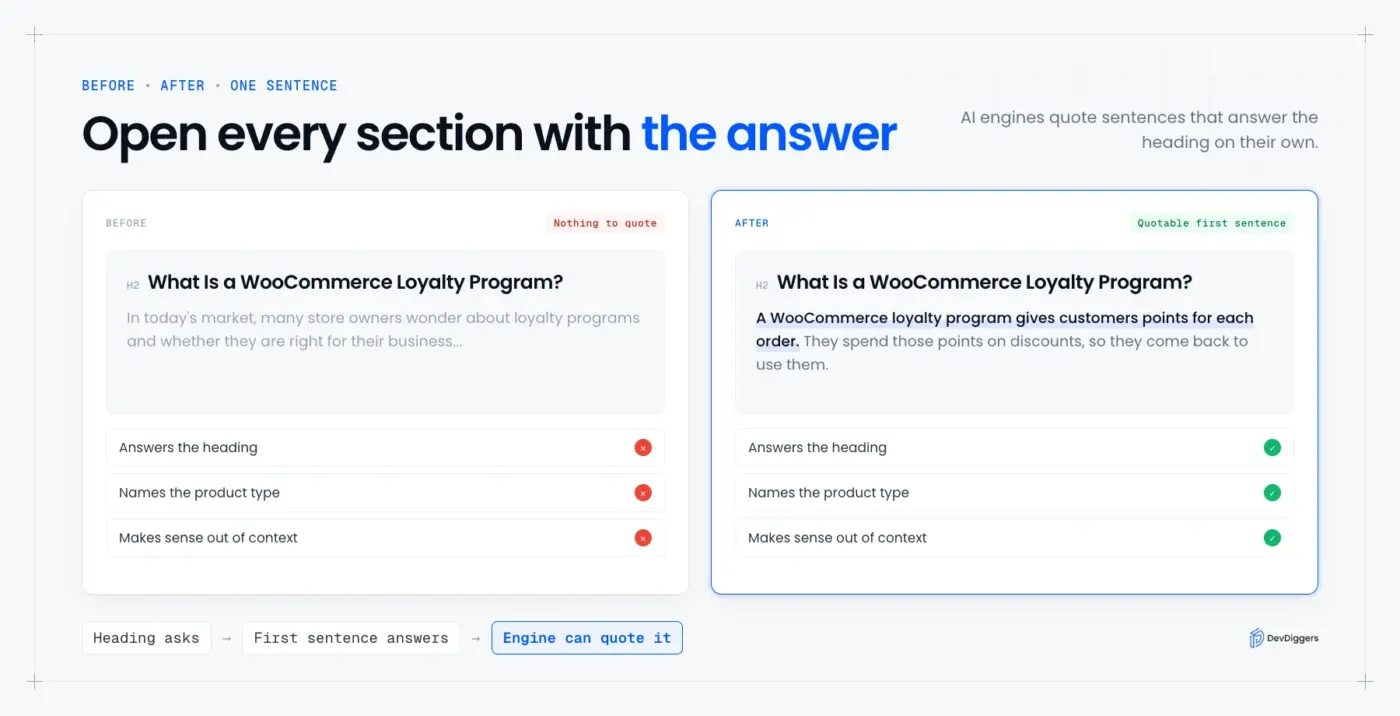
- Answer first openings: Open every section with a direct answer of two or three sentences, then explain it. A skimming reader gets the point first.
- Question shaped headings: Phrase two or three headings as the exact questions buyers type, the same habit that wins voice search.
- Same brand facts everywhere: Describe your brand, products and prices in the same words on your site, author bios, social profiles and marketplace listings.
- Third-party sources: Earn mentions in reviews, comparison articles, forums and directories, because engines cite other sites far more often than your own claims.
- Dated facts: Put a date next to every statistic and version number, and refresh the page when they change.
Here is what an answer first opening looks like in practice. A section that starts “In today’s market, many store owners wonder about loyalty programs” gives an engine nothing to quote.
The rewrite starts with the answer itself: “A WooCommerce loyalty program gives customers points for each order.” That one sentence answers the heading, names the product type and stands on its own.
Brand facts are where small brands slip most easily. Say your pricing page shows $79, a marketplace listing shows $59 and an old review calls it free. An AI answer now has three versions of your price to choose from.
Third-party sources are the slow part and the part with no shortcut. A single honest recommendation in an active forum thread can do more for brand mentions in AI answers than another page on your own domain.
If one audit run looks off, that is expected. ChatGPT does not give everyone the same answer, which is why the audit repeats every prompt. Most of the list above is normal SEO done carefully.
Doing all of this by hand across dozens of pages is where most small teams stall. Our WordPress SEO services cover the audit and the fixes, including crawler rules, content structure and internal linking, if you would rather hand it off.
Common Mistakes When Tracking LLM Visibility
Most failed AI visibility programs break on process, and the tactics are rarely to blame. Teams test once, change the prompts every month, or read a blended score that hides the engine they are losing. These five mistakes are the usual reasons a month of tracking produces nothing you can act on:
- Single runs: One answer per prompt is a sample of one, and the next run can name completely different brands.
- Moving prompt lists: Swapping prompts each month makes it impossible to tell whether visibility changed or the question did.
- Blocked search bots: A security plugin or CDN rule can block OAI-SearchBot without anyone noticing, so check robots.txt and firewall logs.
- Counting mentions only: A mention that states the wrong price does more damage than no mention at all.
- Blended scores only: A combined number can rise while your most valuable engine quietly drops.
Worth checking: DevDiggers’ own robots.txt has no AI crawler rules at all, which leaves every bot allowed by default. That default is fine, but it only stays true until someone installs a plugin that changes it.
Conclusion
AI search visibility can be measured today without a budget. A frozen list of 20 buyer prompts, run three times on four engines, gives you a real citation rate and share of AI voice. Bing’s AI Performance report, GA4 referrals and a robots.txt check fill in the rest.
The improvements are mostly normal SEO done with more care. Get indexed, answer first, keep your facts the same everywhere, and earn mentions on sites the engines already trust.
Run the first audit this month and repeat it on the same date next month. The second run is the one that tells you something.
Frequently Asked Questions (FAQs)
Q1. How do I check if ChatGPT mentions my brand?
Ask ChatGPT the questions your buyers ask, in a logged out or private window, and note whether your brand appears. Run each prompt three times, because answers change between runs. Then check GA4 for sessions with the source chatgpt.com.
Q2. How many prompts do I need to measure AI visibility?
Twenty prompts is a good start for a small brand, run three times on each engine. That gives 60 answers per engine, enough to spot a pattern. Add prompts once the list stops covering how buyers describe your products.
Q3. Is AI search visibility the same as SEO rankings?
No, but they are related. Rankings order a list of links, while AI visibility measures whether an answer names or cites you at all. A May 2026 study found that nearly 30% of AI Overview sources were not on the first page of results.
Q4. Does blocking GPTBot remove my site from ChatGPT answers?
No, GPTBot collects training data, and OpenAI uses a separate bot called OAI-SearchBot for search answers. Blocking OAI-SearchBot is what removes you from ChatGPT search. You can block GPTBot and still appear in answers.
Q5. Can I see AI Overview traffic in Google Search Console?
Not on its own. Google includes AI Overviews and AI Mode traffic in the overall Web search data and offers no separate filter. Of the free reports covered here, only Bing Webmaster Tools shows AI citations directly.
Q6. How often should I re-run an AI visibility audit?
Once a month is enough for most small sites, on the same date with the same prompt list. Weekly checks mostly record random changes between runs. Re-run a single prompt sooner only after you change the page it should cite.
Q7. Can a small WooCommerce store compete with big brands in AI answers?
Yes, on specific questions. Broad prompts like “best eCommerce platform” favor big brands, but narrow ones about a single use case often cite smaller specialist sites. Pick the narrow prompts your products answer best and track those.