
A HIPAA compliant WordPress site is possible, but WordPress itself cannot be certified as compliant. Compliance comes from how you host, configure and connect the site, and from the agreements you sign with vendors.
We checked this guide in October 2026 against HHS guidance, the HIPAA Security Rule text and the Federal Register. We also tested the WordPress screens shown here on a WordPress 7.1.3 test site with Contact Form 7.
The guide covers technical setup only and is not legal advice. Below you will find hosting and BAA steps, encryption rules, forms, tracking pixels, logins and a launch checklist.
Can a WordPress Website Be HIPAA Compliant?
A HIPAA compliant WordPress setup is possible when the site, the host and every connected vendor meet the HIPAA rules. HHS says no standard requires you to certify compliance, and it does not recognize private certifications. The real question is how you build and run the setup.
Is WordPress HIPAA compliant out of the box? No, because the software holds no certification and the rules cover how you run the whole setup.
HHS states this in its FAQ on certification. The same answer warns that an outside certification does not stop HHS from finding a violation later. So a plugin or host that claims to be HIPAA certified has not earned an official badge.
The rules apply to covered entities and business associates. HHS defines a covered entity as a health plan, a health care clearinghouse or a health care provider who conducts certain billing transactions electronically. A business associate is anyone who handles protected health information (PHI) for a covered entity.
Note: This guide explains technical safeguards for a WordPress site. A HIPAA attorney or compliance officer should confirm which duties apply to you.
How to Keep PHI Off Your WordPress Site
The safest way to build a HIPAA compliant website is to keep patient data off WordPress altogether. A vendor that signs a business associate agreement (BAA) holds the data, and your pages link to it. Your own site then carries only public information.
This is a design choice, and it shrinks the part of the system you must protect. Sort your content like this:
- Public pages: Services, hours, directions and team bios can live on WordPress.
- Appointment booking: Send visitors to a booking vendor that signs a BAA. Our WordPress appointment plugin comparison lists options, but confirm each vendor’s BAA terms first.
- Patient forms: Use a form or portal vendor that signs a BAA and links from your page.
- Patient records: Never store them in posts, pages or the Media Library.
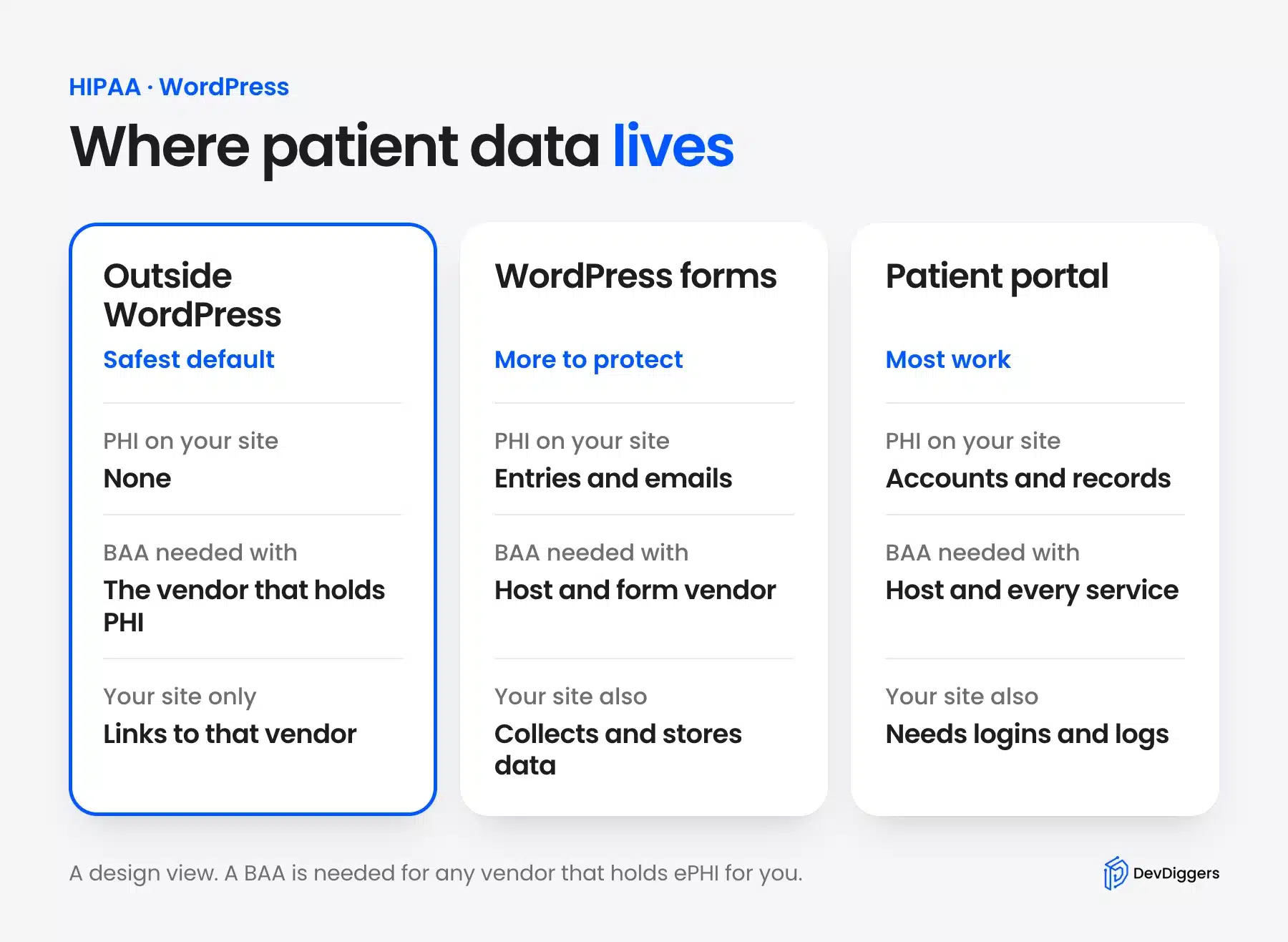
Be careful with small forms. A field such as reason for your visit turns an ordinary contact form into a place where PHI can arrive.
HHS gives a similar example in its tracking technology bulletin. A person who books an appointment through a covered clinic website creates information that third party tools on that page could pick up.
Sometimes a portal is the goal, and keeping everything elsewhere is not possible. The sections below then apply to your own site in full.
HIPAA Compliant WordPress Hosting and the BAA
A host that stores or processes ePHI for you is a business associate and needs a signed BAA with you. HHS says a covered entity that keeps ePHI with a cloud provider and no BAA violates the HIPAA Rules. Ask for the BAA before you move any data.
The HHS cloud computing guidance says the BAA must require the provider to report security incidents to you. It also says OCR does not endorse or recommend specific technology or products. Choose a host by its agreement and its controls.
Ask every HIPAA compliant WordPress hosting candidate these questions:
- BAA scope: Which plans and services does the BAA cover?
- Related services: Do backups, email and a CDN fall inside the agreement?
- Incident reports: How and how fast will the host tell you about a security incident?
- Access control: Who at the host can reach your server and your data?
- Exit plan: How is your data returned or destroyed when you leave?
Note the spelling. The agreement is a business associate agreement and the short form is BAA. Some web pages misspell it as BBA, and that typo can cost you a search of your own contracts.
The guidance also says the host is a business associate even when it holds only encrypted data and has no decryption key. A lack of keys does not remove the need for a BAA. Treat any service that stores or transmits ePHI the same way.
What HIPAA Requires for Encryption and HTTPS
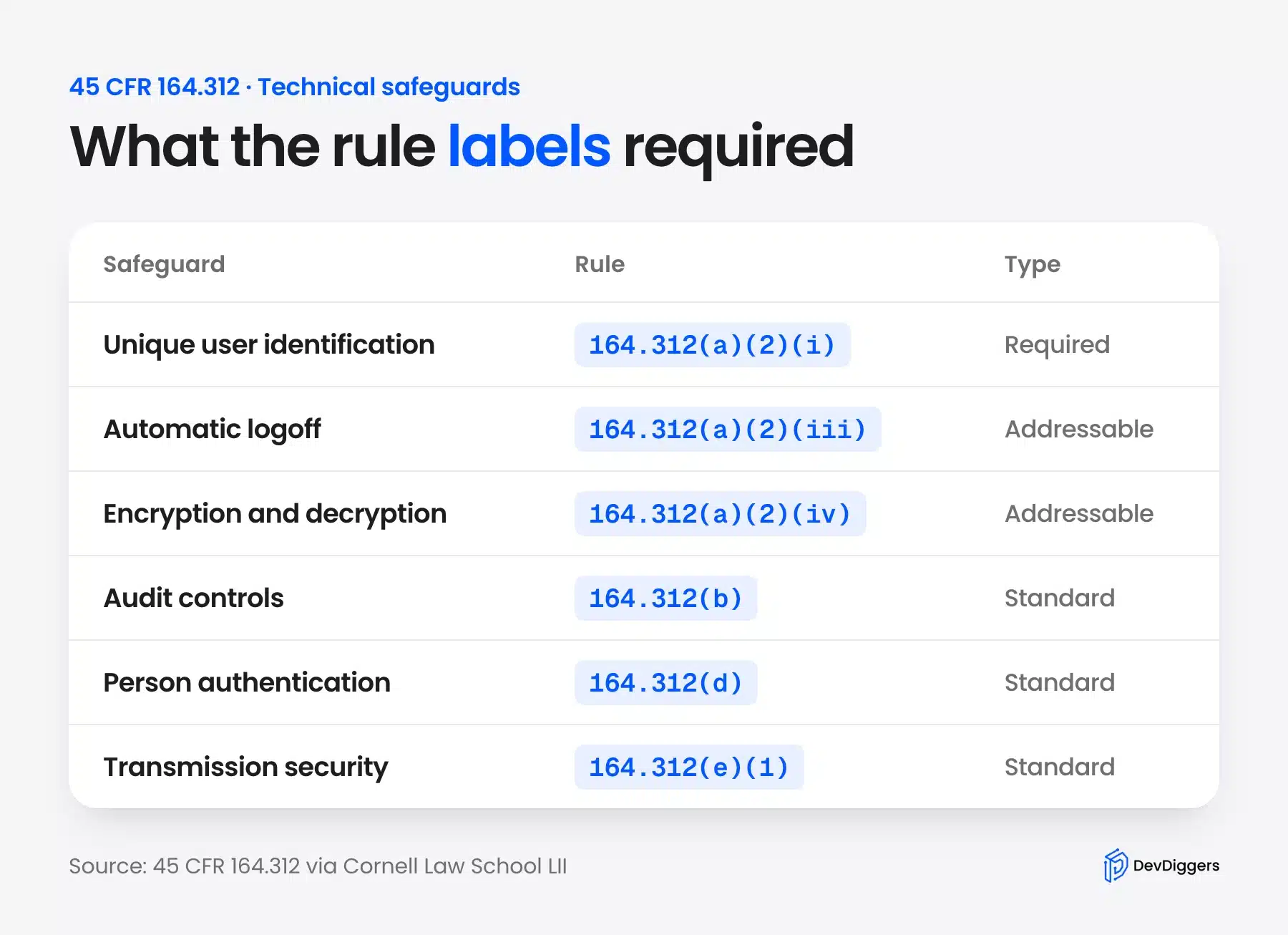
The Security Rule lists encryption as an addressable specification. You must assess it for your environment and then either implement it or document why an equivalent measure fits better. A new rule could make encryption required, but we found no final rule in the Federal Register as of October 15, 2026.
Here is the text. 45 CFR 164.312 labels encryption and decryption of ePHI as Addressable. The same section sets a transmission security standard for ePHI sent over a network.
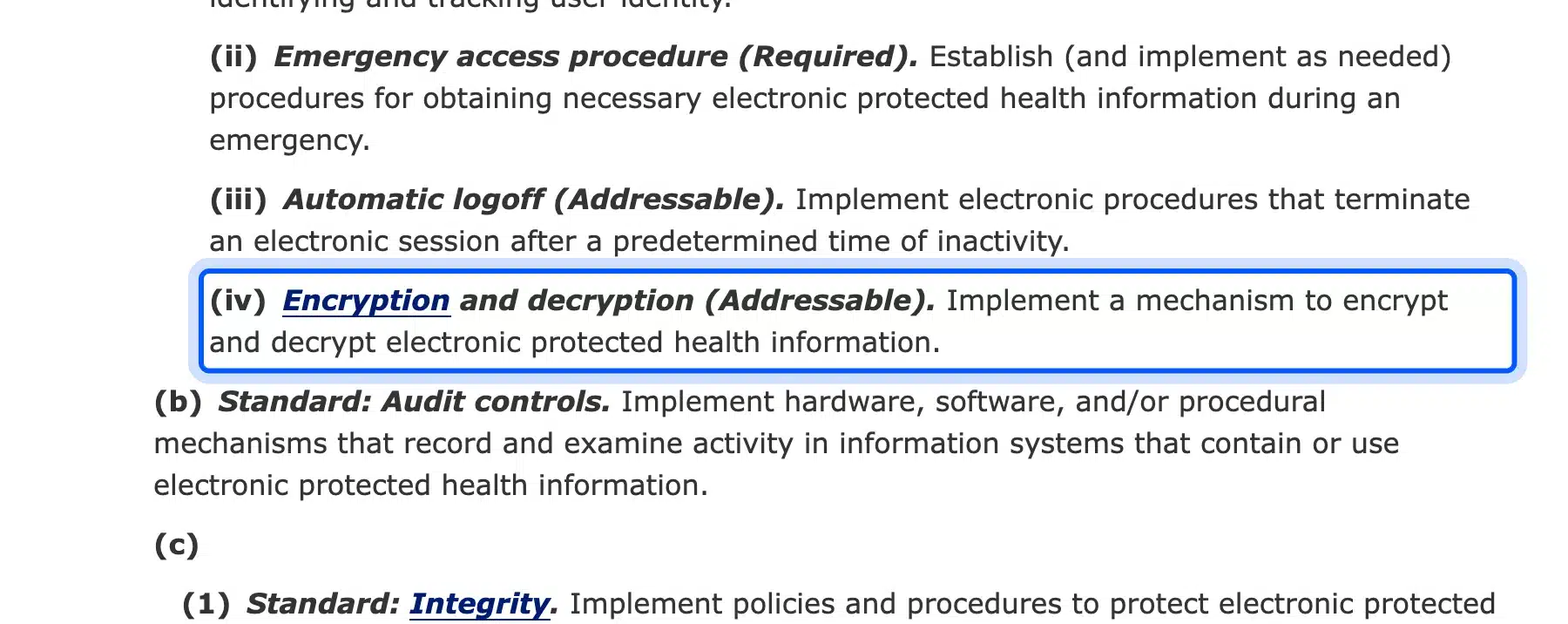
Section 164.306 says you must assess whether each addressable item is reasonable and appropriate. You then implement it, or you document why not and use an equivalent measure. It never means you may ignore the item.
The proposal to change this is real. HHS published a proposed rule on January 6, 2025 to strengthen the Security Rule. It is only a proposal until a final rule appears.
For a website, encryption in transit means HTTPS. WordPress.org lists HTTPS support among the host features it recommends. Install a valid certificate and send every page that collects data over HTTPS.
Older advice may tell you to add a VPN for the website. The Security Rule does not require one.
HHS also says the HIPAA Rules do not require specific technology. HTTPS plus a host that encrypts stored data is the usual approach. If your certificate breaks, our guide to common SSL issues in WordPress helps you repair it.
Ask your host whether the database and backups are encrypted at rest. Document the answer in your risk analysis.
Do WordPress Forms Need to Be HIPAA Compliant?
A WordPress form must be HIPAA compliant when it collects PHI for a covered entity or business associate. That makes the form plugin, the database and any email notification part of your compliance scope. A form that collects no health information is a lower risk, and you should still review the fields.
HIPAA compliant WordPress forms need more than a lock icon. Look at where the data goes after a patient presses Send. Many form plugins email the full message and some also store entries in your database.
We checked Contact Form 7 on our test site to see the default. Its Mail tab puts the whole message into the email through the message tag. Anything a patient types in that field travels by email to your inbox.
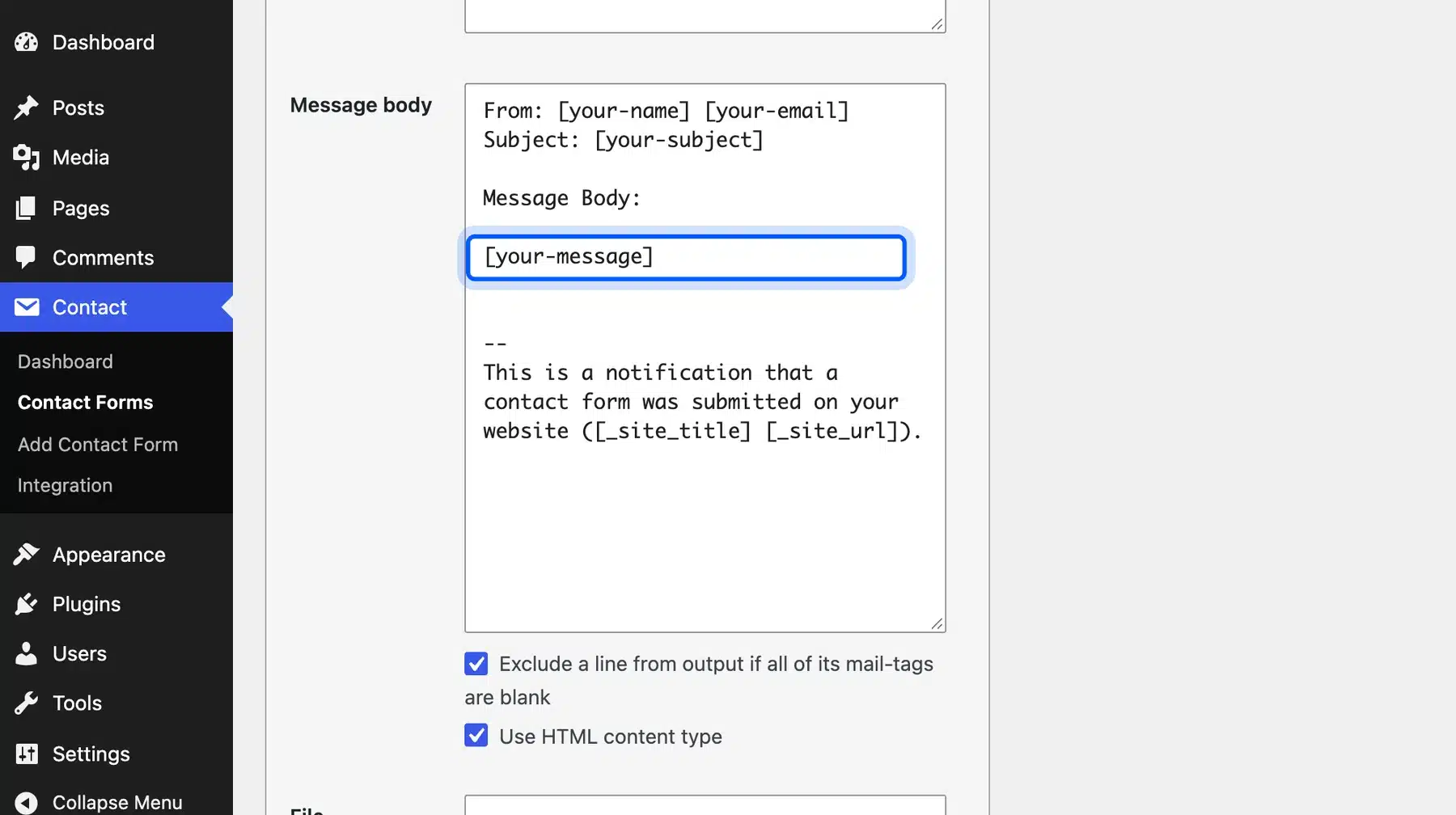
Use these rules for a form that may receive PHI:
- Notification only: Send an alert with a link to the entry and leave the message text out of the email.
- Storage: Treat stored entries as ePHI and cover them with your BAA and access controls.
- Vendor check: Ask any form service for a BAA before you connect it.
- Uploads: Keep patient files out of the Media Library, because its files have public URLs.
HHS does not certify plugins. A page that says a plugin is HIPAA compliant describes the vendor’s claim.
Read the documentation and sign the BAA before you trust it. Our guides on checking form submissions in WordPress and getting notifications on form submissions show where entries and alerts live.
Tracking Pixels and Analytics on a HIPAA Website
Tracking tools on pages that collect or reveal PHI create a HIPAA risk. HHS says regulated entities may not use tracking technologies in a way that causes impermissible disclosures of PHI to tracking vendors. A tracking vendor that receives PHI is a business associate and needs a BAA.
The HHS bulletin separates two kinds of pages. Pages behind a login, such as a patient portal, usually have access to PHI. Public pages with general information, such as hours and location, often do not.
One part of the bulletin changed. On June 20, 2024 a federal court in Texas vacated part of that guidance.
The vacated part said HIPAA duties apply when a tool links an IP address to a visit to a public page. That page had to be an unauthenticated page about health conditions or providers. HHS said it was evaluating its next steps.
The login and registration pages need special care. The bulletin says that if tracking on a portal login or registration page collects login or registration details, that is a disclosure of PHI. Keep analytics, advertising pixels and session replay tools off those pages and off any appointment flow.
Review your tags before launch. Check your theme, your plugins and any scripts pasted into the header. Remove what you cannot cover with a BAA.
Logins and User Roles for a HIPAA Website
Give every person who touches your site their own account and the lowest role that does the job. The Security Rule marks unique user identification as Required, and it sets standards for access control, audit controls and person authentication. Shared admin logins break all of that.
Open Users > Add User and pick the role carefully. WordPress defaults a new user to Subscriber, and you raise it only when the work needs it.

Add these controls on top of roles:
- Strong sign-in: Use long unique passwords and two-factor authentication for admins.
- Login limits: Lock out repeated failures. Our guide to limiting login attempts in WordPress shows the setup.
- Automatic logoff: The Security Rule lists automatic logoff as Addressable. Assess an idle timeout for admin sessions.
- Audit logs: Record who logged in and who changed what. The rule asks for mechanisms that record and examine activity in systems that contain ePHI.
A log plugin writes to your database. Check that it does not capture patient details itself.
Keep the logs as long as your policy says. Our WordPress brute force protection guide covers the attack side.
Updates and Risk Analysis for a HIPAA Website
Keep WordPress core, themes and plugins updated, and run a written risk analysis. HHS says covered entities and business associates must conduct risk analyses that identify threats and vulnerabilities to ePHI. Section 164.306 also says to review and change security measures as needed.
A risk analysis is a written document.
List every place ePHI can enter, rest and leave. Then note the risk and the control for each place. HHS publishes guidance on risk analysis that explains what to cover.
Unpatched plugins are the common weak spot on a WordPress site. Our WordPress vulnerability scanner guide shows how to check for known problems. Our WordPress security checklist covers the basics that every site needs.
Plan for backups and recovery too. The HHS cloud guidance lists back-up and data recovery among the topics a service agreement should settle. Test a restore at least once a year.
HIPAA Compliant WordPress Plugins and Themes
No plugin or theme can make a site HIPAA compliant by itself because HHS does not recognize private certifications. A HIPAA compliant label on a plugin page is the vendor’s own claim about the product. Judge each product by what it stores, where it sends data and whether the vendor signs a BAA.
Ask three questions about any plugin that touches patient data:
- Storage: Does it keep data in your database or send it to the vendor’s servers?
- Agreement: Does the vendor offer a BAA?
- Scripts: Does it load third party scripts on pages that collect data?
Themes rarely handle PHI, but they can load tracking scripts, fonts and widgets from outside services. Review what your theme loads on pages that collect data. A simple theme with few outside calls is easier to defend.
HIPAA Compliant WordPress Checklist
Use this checklist before you launch a site that handles patient information. It turns the sections above into six checks that one person can run in an afternoon. Repeat the checks after every major change to the site, the host or any connected vendor.
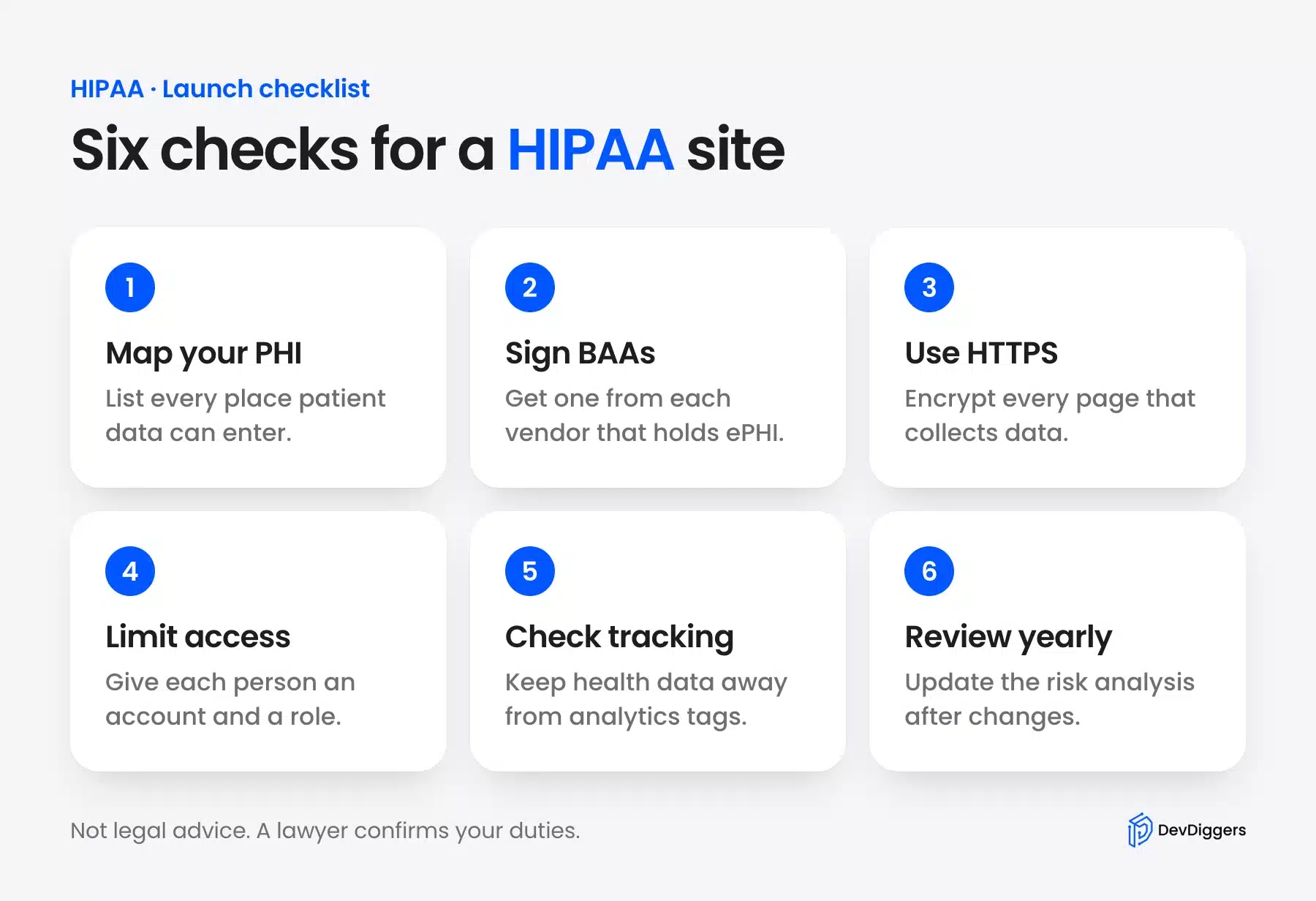
If you want help with the technical side, our WordPress security services cover malware cleanup, security audits and hardening. A WordPress care plan adds ongoing upkeep after that. Neither one replaces legal advice.
Conclusion
A HIPAA compliant WordPress site depends on your whole setup. Keep PHI off the site when you can, sign a BAA with every vendor that holds ePHI, and use HTTPS.
Control who logs in and what scripts load. Write down your risk analysis and review it every year. Ask a HIPAA attorney to confirm the legal side before you collect any patient data.
Frequently Asked Questions (FAQs)
Q1. What does BAA stand for and who signs it?
BAA stands for business associate agreement. You sign one with each vendor that creates, receives, maintains or transmits ePHI for you. The HHS cloud guidance says this includes cloud hosts.
Q2. Is encryption required by HIPAA?
Encryption of ePHI is an addressable specification under 45 CFR 164.312. You must assess it and implement it or document an equivalent measure, as section 164.306 explains. A proposed rule would make it required, but we found no final rule as of October 2026.
Q3. Does HIPAA require a VPN for a website?
No, the Security Rule asks for technical measures that guard ePHI in transit and does not name a VPN. The HHS cloud guidance says the HIPAA Rules do not require specific technology. A website normally uses HTTPS.
Q4. Can I use analytics on a HIPAA website?
You can use analytics where no PHI reaches the vendor. The HHS tracking bulletin says a vendor that receives PHI is a business associate and needs a BAA. Keep tags off logins, registration and appointment pages.
Q5. Who can certify my website as HIPAA compliant?
Nobody can give an official certification. HHS says no standard requires you to certify and it does not recognize private certifications, as the HHS FAQ states. Treat a badge as a vendor claim.
Q6. How often should I review my HIPAA website setup?
Review it whenever the site changes and on a regular schedule. Section 164.306 says to review and modify security measures as needed and to update the documentation. Many teams review yearly.