
The best WooCommerce alternatives in 2026 are Shopify, BigCommerce, Squarespace, Wix and Ecwid, and each one suits a different kind of store. Most stores that already run on WordPress should still stay on WooCommerce.
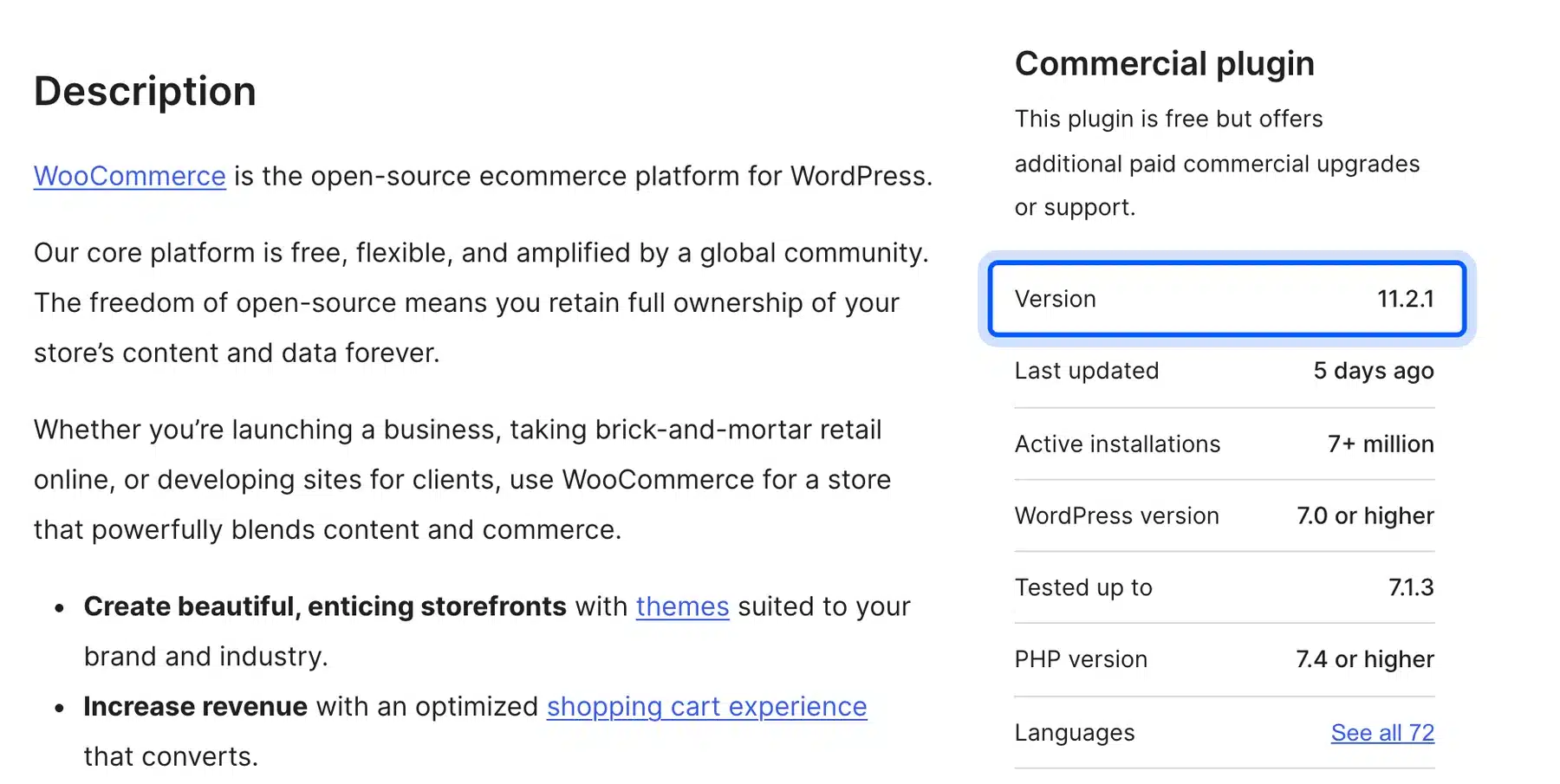
Every price below comes from the vendor’s own pricing page, checked on 14 October 2026. The WooCommerce facts come from WooCommerce 11.2.1, the current release on WordPress.org at that date.
You will see what each platform costs, where each one wins, and when leaving is a mistake. You will also get a short plan for moving a store without losing search traffic.
What WooCommerce Alternatives Cost in 2026
Most hosted WooCommerce alternatives charge between $29 and $39 a month for an entry plan and add payment fees. WooCommerce itself is free open source software. Its real costs are hosting, extensions and your time. The table shows what each vendor publishes today.
| Platform | Entry plan (USD a month) | Free trial | Fee on outside payment gateways |
|---|---|---|---|
| WooCommerce | $0 for the software with hosting extra | Not needed | None from WooCommerce |
| Shopify Basic | $29 billed yearly or $39 monthly | 3 days free and then $1 a month for 3 months | 2% |
| BigCommerce Core | $29 billed annually or $39 monthly | 15 days | 2% |
| Squarespace Basic | $19 to $25 by billing choice | 14 days | 2% on Basic, 0% on Core and up |
| Wix Core | From $29 | See Wix | Check the plan page |
| Ecwid Starter | About $5 for up to 10 products | See Ecwid | Check the plan page |
The prices come from Shopify’s pricing page, BigCommerce’s pricing page and Squarespace’s pricing page. Wix lists its Core plan at $29 on its own plans page. Prices change. Confirm them before you buy.
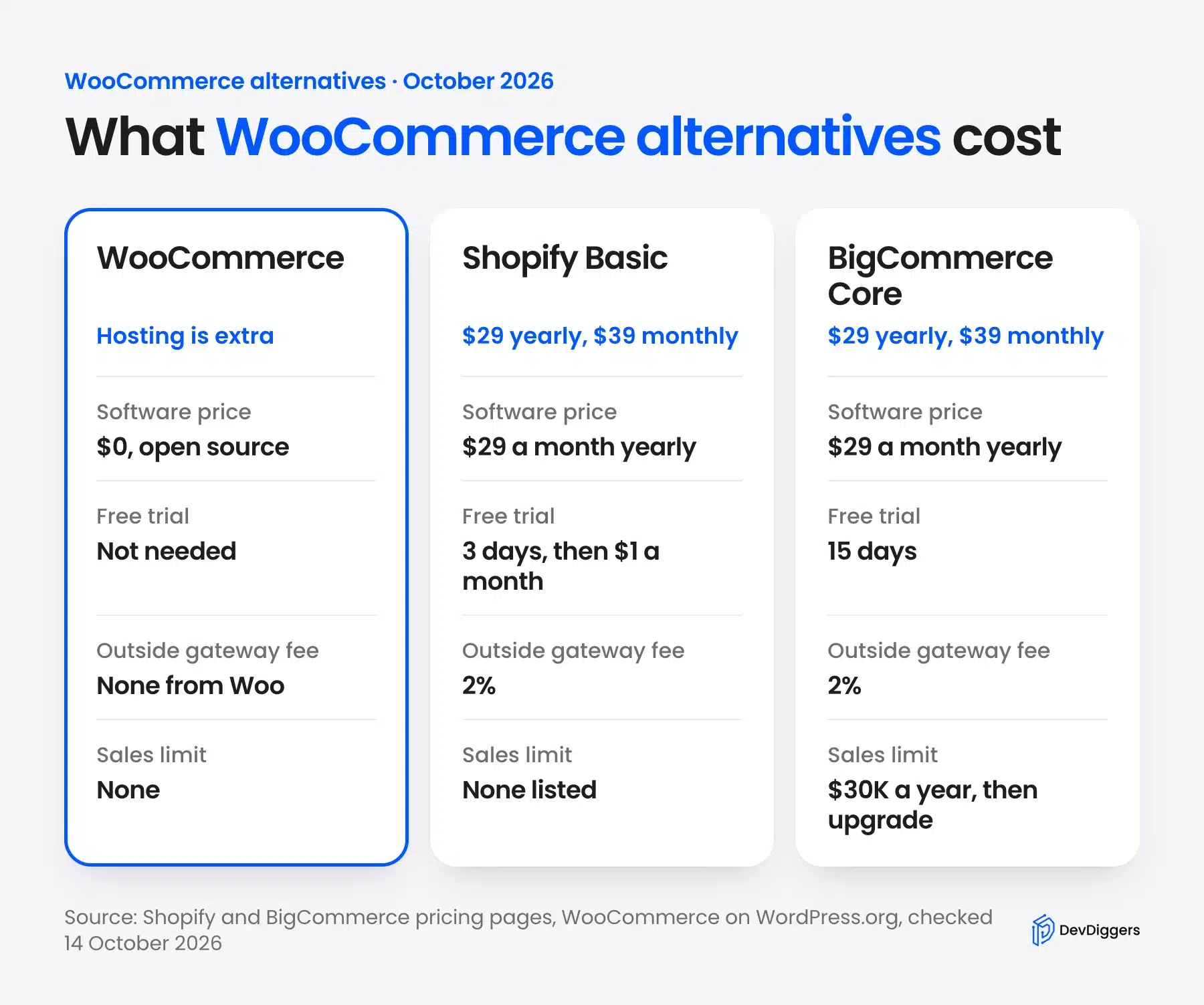
The fee on outside gateways matters more than the sticker price. On Shopify Basic, a third-party gateway adds 2% to every order, according to Shopify’s pricing page. A store that sells $10,000 a month through such a gateway pays $200 a month on top of the plan.
A Fair Year-One Cost Example
A fair year-one comparison adds the plan, the payment fees and everything the plan does not include. Take a store that sells $5,000 a month through an outside gateway on Shopify Basic. The platform costs $348 a year on yearly billing, and the 2% fee adds $1,200.
That is $1,548 before apps, a theme or card processing. WooCommerce has no platform fee. Its year-one cost is your hosting plus any paid extensions. Get a real quote from your host and add it to the same sheet.
Treat the numbers as an example and never as a forecast. Your sales, gateway and app list change the result. Run your own figures through the vendor pricing pages.
Why Store Owners Look for WooCommerce Alternatives
Store owners leave WooCommerce mostly because they want someone else to run the technical side. WooCommerce runs on your own hosting. You handle updates, backups, speed and security yourself. A hosted platform takes that work away for a monthly fee.
Three reasons come up again and again:
- Upkeep: Every WordPress, theme and plugin update needs a test before it goes live. A store with many extensions has more updates to check.
- Speed: A slow store usually points to hosting, images or heavy plugins. Our guide to speeding up a WooCommerce website shows how to find the cause first.
- Cost surprises: The software is free, but a good host, a premium theme and paid extensions add up.
None of these means WooCommerce is a bad platform. WooCommerce 11.2.1 reached WordPress.org on 9 October 2026, which shows the project ships steady updates.
When WooCommerce Is Still the Better Choice
WooCommerce is the better choice when your store lives inside a WordPress site and you want to own your data. It charges no platform fee on sales, and you pick your own payment gateways. A hosted platform cannot match that control on any plan.
Shopify lists a 2% fee on third-party gateways for its Basic plan, as the Shopify pricing page shows. BigCommerce charges a monthly Open Payment Provider fee of 2% on Core for orders that use outside gateways. Its pricing page explains the rule.
Stay on WooCommerce in these cases:
- Content drives sales: Your blog and your store share one site, one login and one set of SEO settings.
- You need custom behavior: WooCommerce is open source. A developer can change almost any part of it.
- You sell something unusual: Subscriptions, bookings and custom checkouts are easier when you control the code.
Our comparison of WordPress vs WooCommerce and our review of whether WordPress is good for eCommerce go deeper on this.
Before you leave over a missing feature, check whether a plugin fixes it. If your store lacks repeat-purchase rewards, a WooCommerce Points and Rewards plugin adds them without a platform change. Switching platforms for one feature costs far more.
Browse our WooCommerce plugins for missing features such as a point of sale, AR product views or an affiliate program before you plan a move.
Shopify vs WooCommerce: The Easiest Hosted Switch
Shopify is the easiest hosted switch because it handles hosting, security and updates for you. Basic costs $29 a month on yearly billing and $39 on monthly billing. Shopify also advertises a trial of 3 days free and then $1 a month for 3 months.
That makes the first quarter cheap, but the real bill starts afterward. Third-party gateways add a 2% fee on Basic, and Shopify Payments charges 2.9% plus 30 cents on online card sales at that tier.
- Key features: Unlimited products, a hosted checkout, sales on social channels and an app store for extras.
- Pricing: Basic is $29 a month yearly, Grow is $79 and Advanced is $299, from the Shopify pricing page.
- Best for: Owners who want to sell without managing a server.
Pro Tip: You don’t have to move in one step. W2S – WooCommerce to Shopify Sync lets you run WooCommerce and Shopify side by side while you test. It keeps products, orders, customers, and inventory in sync, so you can try Shopify with real store data before you switch. A free version is available.
Shopify is not the best fit if you need deep control of checkout code on lower plans. Plus, which starts at $2,300 a month, opens that up.
BigCommerce vs WooCommerce: Fewer Apps to Manage
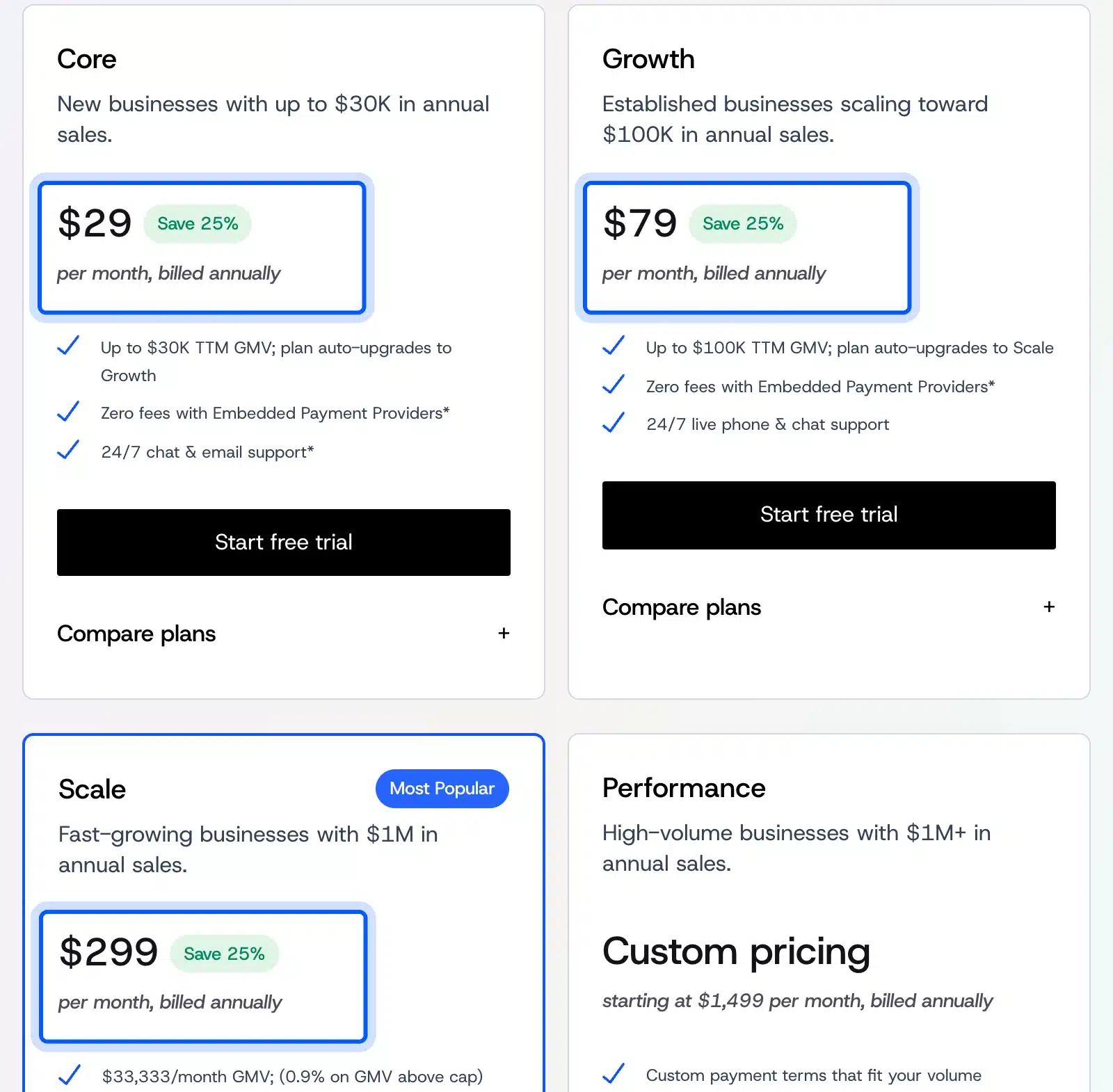
BigCommerce suits growing stores that want built-in features instead of many extensions. Core costs $29 a month on annual billing and $39 on monthly billing. Its plans follow your sales volume. Each plan has a sales cap that triggers an upgrade.
That sales link is the detail most reviews skip. Core covers up to $30,000 in trailing 12-month sales.
Say your store sells $40,000 in a year. It then moves up to Growth at $79 a month on annual billing, which is $948 a year against $348 on Core.
- Key features: A 15-day free trial, 24/7 chat and email support, and a plan that upgrades automatically as sales grow.
- Pricing: Core is $29, Growth $79 and Scale $299 a month on annual billing, per BigCommerce’s pricing page.
- Best for: Stores with real sales volume that dislike plugin juggling.
Squarespace: Good When Design Comes First
Squarespace works best for stores with a small catalog and a strong brand look. Its commerce plans carry a 14-day free trial. The Basic plan charges a 2% transaction fee on online store sales, while Core and higher plans charge 0%, per Squarespace’s pricing page.
Basic runs between $19 and $25 a month depending on billing, and the higher tiers cost more. Read the plan table before you choose, because some fees differ for digital content and memberships.
The 2% fee on Basic works like Shopify’s outside gateway fee. A shop that sells $3,000 a month pays $60 a month on that plan, and Core removes it.
- Key features: Design templates, built-in AI tools and a free custom domain on its plans, with terms on its pricing page.
- Pricing: Four commerce plans from Basic to Advanced, with transaction fees that fall as the plan rises.
- Best for: Designers, makers and small shops with a few dozen products.
Squarespace is weaker for large catalogs and unusual checkout rules. If you plan to sell hundreds of variants, look at Shopify or BigCommerce first.
Wix: A Website Builder With Store Features
Wix is a good pick when you want one builder for pages, bookings and a small store. Its Core plan, the first one that accepts payments, starts at $29 a month, according to the Wix plans page. Business is $39 and Business Elite is $159.
The price ladder is steep at the top. Business Elite costs more than five times Core. Compare what each tier unlocks before you pick one.
- Key features: Payments, basic eCommerce tools, scheduling and 50 GB of storage on Core, with a larger marketing suite on Business.
- Pricing: Core $29, Business $39 and Business Elite $159 a month at the time of checking.
- Best for: Small businesses that want a simple site with a store attached.
Ecwid: Add a Store to a Site You Already Have
Ecwid adds a store to a site you already own (including a WordPress site) instead of replacing it. It lists plans from Starter to Unlimited. Starter covers up to 10 products and Unlimited removes the product limit per Ecwid’s pricing page.
Older guides, including the earlier version of this one, say Ecwid has a free plan. Its pricing page now shows Starter as the entry plan and no plan named Free.
- Key features: A store you can embed on WordPress, Wix, Squarespace or another site, with product limits that rise by plan.
- Pricing: Starter is about $5 a month, Venture $29, Business $49 and Unlimited $119 on annual billing.
- Best for: Owners with a working site who want to sell a handful of items.
If your store is small, our guide to selling on WordPress without WooCommerce covers other lightweight options.
OpenCart: A Free Self-Hosted Alternative
OpenCart is the closest free alternative, because it is open source software you host yourself. Its own site says it comes with free downloads and updates and zero monthly fees. You still pay for hosting, the same as with WooCommerce.
That means OpenCart solves a cost worry but not an upkeep worry. You still handle updates, backups and security on your server. Choose it only if a developer on your team already knows it.
For most WordPress owners, OpenCart means rebuilding the whole site for little gain. The OpenCart website lists the download and license terms.
What to Check Before You Leave WooCommerce
Check four things before you leave WooCommerce: your extensions, your payment gateways, your product data and your URLs. Each one can cause a lost sale or a lost ranking if you skip it. A short audit takes an afternoon and saves weeks of fixes.
Run the audit on paper first, before you pay for any trial. Trial clocks run out fast, and the free part of a Shopify trial lasts only 3 days. Know your answers before you start the clock.
- Extensions: List every plugin you use and name what replaces it on the new platform. A feature with no match is a reason to pause.
- Payment gateways: Confirm your current gateway works there, and check the fee it adds.
- Product data: Export your catalog and test how variations, images and categories import.
- URLs: Write down your top product and category URLs for redirects.
Which WooCommerce Alternative Should You Choose?
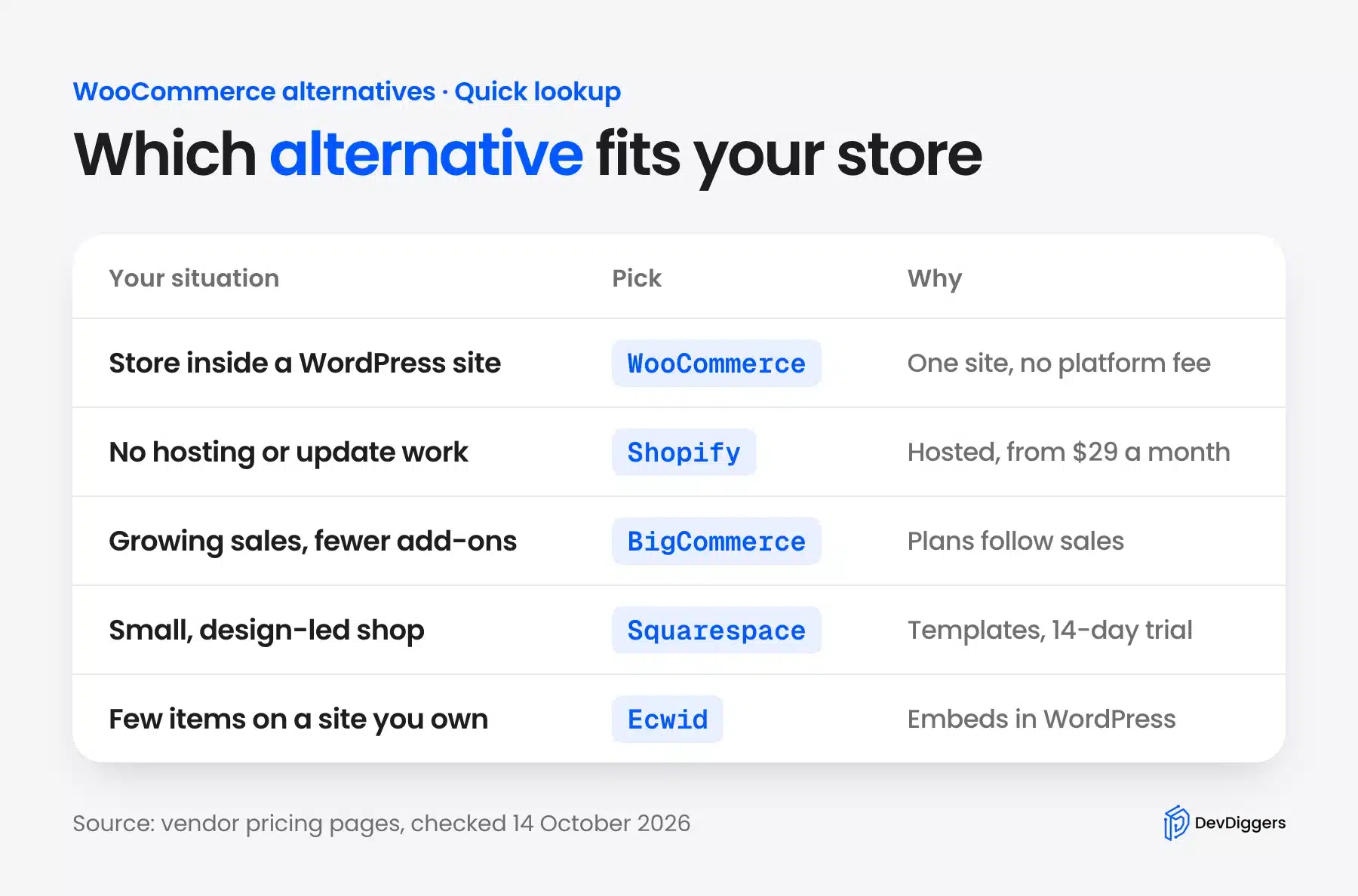
Choose by your situation and ignore the longest feature list. If your site runs on WordPress and sells content as well as products, keep WooCommerce for its control and its lack of platform fees. If you want no hosting work at all, pick Shopify.
If sales volume is high and you want fewer add-ons, pick BigCommerce. Small catalogs fit Squarespace, Wix or Ecwid.
The infographic below turns that into one lookup you can save.
Two honest checks come before any move. First, list the extensions you use today and see what replaces each one. Second, price the full first year with apps, themes and payment fees.
Our page on using WooCommerce without WordPress explains what you can and cannot separate from WordPress.
How to Migrate WooCommerce to Shopify or Another Platform
You can migrate WooCommerce to Shopify, or to another platform, by exporting your data, importing it into the new store and redirecting old URLs. Products leave WooCommerce as a CSV file. Plan the move for a quiet sales period, because URLs and checkout both change.
In WooCommerce, go to Products > All Products, where the Import and Export buttons sit beside Add new product, per the WooCommerce product CSV documentation. Shopify then accepts a product CSV, and its guide to migrating from WooCommerce lists the steps.
Search traffic is the part people lose. Google recommends server-side permanent redirects, such as 301 and 308. It also advises avoiding redirect chains, per its site move documentation.
- Map every URL: Match each old product and category URL to its new one before launch.
- Test a small batch: The WooCommerce documentation advises a staging test with a small import before a large catalog.
- Watch for 404s: Check your error reports in the first weeks and fix missing redirects.
Conclusion
WooCommerce alternatives make sense when you want someone else to run hosting and updates, and you accept monthly fees plus payment costs. Shopify is the simplest hosted move. BigCommerce suits stores with higher sales, and Squarespace, Wix and Ecwid fit small catalogs.
If your store sits inside a WordPress site or you want to own your data, WooCommerce is usually still the right call. When the real problem is speed, a missing feature or upkeep, our WooCommerce development services can fix it without a move.
Frequently Asked Questions (FAQs)
Q1. What is the best WooCommerce alternative?
Shopify is the best alternative for most owners who want no hosting work. BigCommerce suits higher sales volumes, and Squarespace or Wix suit small design-led shops. If your store lives in WordPress, staying on WooCommerce usually beats leaving.
Q2. Is Shopify better than WooCommerce?
Shopify is easier because it hosts and updates your store, while WooCommerce gives you more control and charges no platform fee on sales. Shopify Basic costs $29 a month on yearly billing, per its pricing page. WooCommerce is free software, but hosting is extra.
Q3. Is there a free WooCommerce alternative?
WooCommerce itself is the free option, since it is open source, but you still pay for hosting. OpenCart is also free software with the same hosting cost. The hosted platforms in this guide charge monthly fees, and some offer trials, such as BigCommerce’s 15 days.
Q4. Does Ecwid still have a free plan?
Ecwid’s pricing page now lists Starter, Venture, Business and Unlimited, and it does not show a plan named Free. Starter covers up to 10 products. Check the page again before you sign up, because plans change.
Q5. Can I move my WooCommerce store without losing SEO traffic?
You can keep most of your traffic if you map every old URL to a new one with 301 or 308 redirects before launch. Google’s site move documentation recommends server-side permanent redirects. Expect some ranking movement in the first weeks.
Q6. What is the best alternative to WooCommerce for a WordPress site?
Ecwid adds a store to a WordPress site, and our guide to selling on WordPress without WooCommerce lists lighter plugins. Hosted builders like Wix and Squarespace replace WordPress instead of working beside it. For most WordPress sites, WooCommerce remains the simplest fit.